
The WordPress project released version 7.0, named “Armstrong,” on an unspecified date this month. The update introduces a new foundational layer for artificial intelligence integration, alongside visual editing improvements and performance enhancements. This major release affects how site owners build, update, and manage their websites.
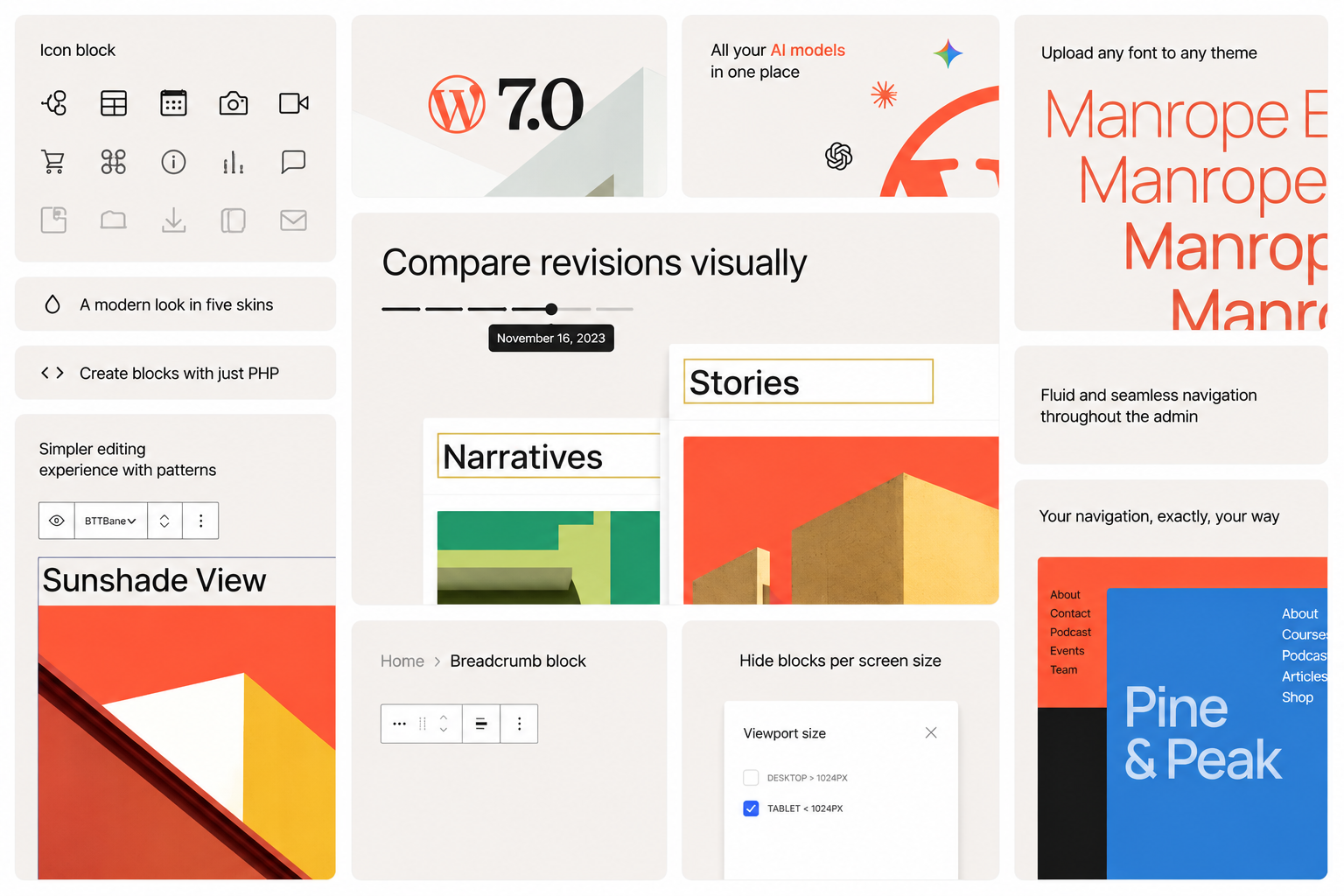
WordPress 7.0 includes both immediate visual changes and deeper structural updates. Visible improvements include a refreshed dashboard, visual revision history, and responsive block visibility controls. Behind the scenes, the release provides a more consistent framework for plugins, tools, and AI services to operate within the platform.
New AI Infrastructure
WordPress 7.0 introduces a shared AI layer designed to integrate artificial intelligence tools into the core system. Previously, plugins had to build their own separate AI connections. The new release includes an AI Client, a Connectors API, and a dedicated Connectors screen for managing external services.
The AI Client allows plugins to communicate with AI models such as Claude, ChatGPT, and Gemini. Site owners can manage these integrations from a single location. The AI features are optional and must be explicitly enabled by the site owner. No data is automatically shared with AI services upon installation.
An optional AI plugin already provides features like title and excerpt generation, image generation and editing, and suggested alt text within the editor. As more plugins adopt the same system, AI tools across WordPress are expected to become more consistent and easier to manage.
Editing and Design Improvements
The release brings visual revision history to posts and pages. Instead of viewing a textual comparison, users can review changes with visual markers and navigate between versions. A new default admin color scheme, smoother screen transitions, and a Command Palette shortcut in the top admin bar are also included.
Font management has been expanded. The Font Library now works across block, hybrid, and classic themes, allowing users to browse, install, and manage fonts from a single location.
Design flexibility has been increased with a dedicated editing canvas for navigation overlays. Mobile menus can now include blocks, columns, typography, and custom close buttons. Responsive block visibility allows users to choose which blocks appear on desktop, tablet, or mobile devices.
New and Improved Blocks
WordPress 7.0 introduces a Breadcrumbs block for helping visitors navigate a site, and an Icon block with a built-in library of visual cues. Gallery lightbox functionality has been improved for smoother image browsing. The Heading block has been updated to simplify work with page structure.
Block-level CSS controls provide more flexibility for custom styling. Patterns can now be edited as a single block, allowing text and image swaps without navigating through nested blocks. Advanced controls remain available for users who need them.
Developer and Performance Updates
The release provides a more consistent foundation for developers building plugins, blocks, patterns, and site-editing experiences. Expanded APIs, PHP-only block registration, a more extensible Site Editor, and routing improvements for custom Site Editor pages are included.
Over 875 contributors from around the world worked on the release. The project is maintained by the open source WordPress community.
WordPress.com Implementation
WordPress.com, the commercial hosting platform, has integrated the new AI foundations with tools already live on the platform, including an AI Assistant, Claude connections, and Studio workflows. Real-time collaboration for teams is available on select plans.
The full list of changes and technical details are available in the WordPress 7.0 Source of Truth document.
Source: WordPress Blog