
A significant update to the Jetpack Social plugin for WordPress was released this week, introducing features for customizing and previewing content across different social media platforms. The update, version 15.6, is available now for users of the plugin, which is developed by Automattic.
The changes are designed to give publishers more control over how their WordPress content appears on various social networks. The update allows users to tailor messages, images, and formatting specifically for platforms like LinkedIn, X, and Facebook directly from the WordPress editor.
Platform-Specific Customization
Previously, users often shared identical posts across all connected social accounts. The new functionality enables separate customization for each platform before publication. This means a user can create a detailed caption for a LinkedIn update, a shorter message for X, and select a different image for Facebook, all from a single interface within the post editor.
Enhanced Image Creation and Interface
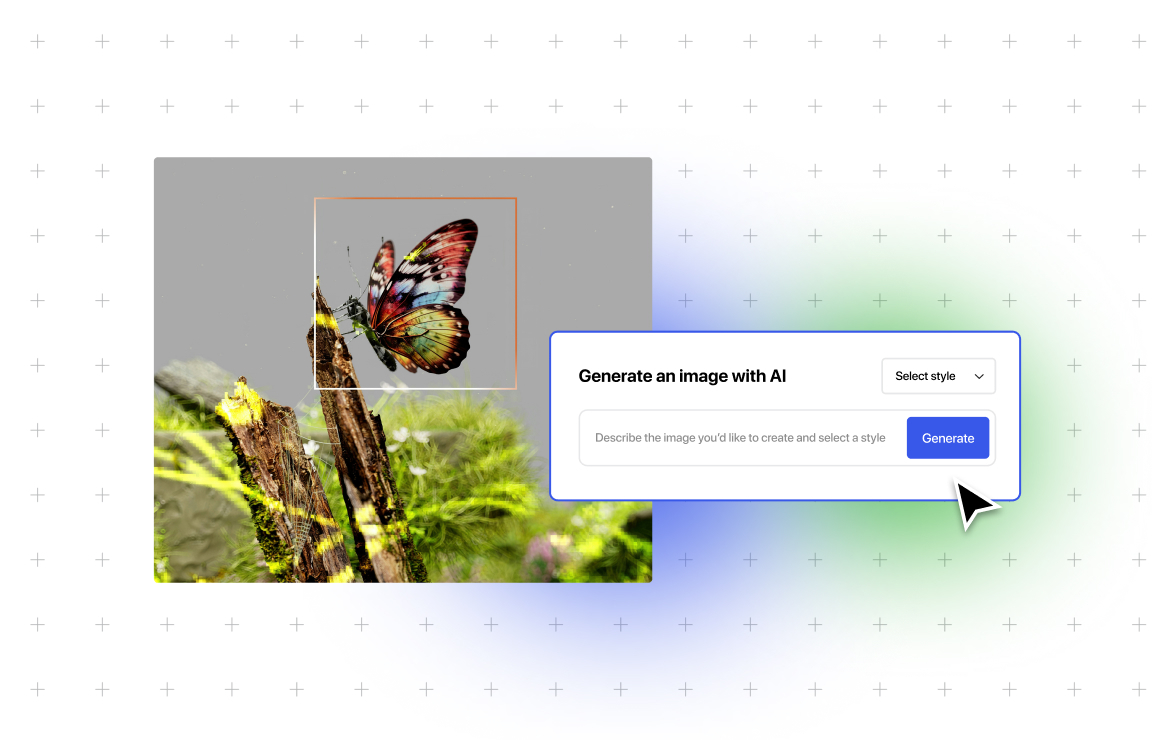
The update integrates AI-powered image generation tools more deeply into the sharing workflow. Users can type a description, select a style, and generate an image for their social posts without leaving the editor. This feature exists alongside a template-based image generator, with both options now consolidated into a single media selection panel.
The editor sidebar itself has been redesigned for clarity. Media selection, image templates, and AI tools are unified, which the developer states reduces the number of clicks needed to configure a post. Visual indicators now show which social accounts are active for a given post.
Improved Preview and Review Systems
A completely rebuilt preview modal shows users how their post will render on each social network before it is shared. The developer notes that previews for platforms like Threads and Tumblr now display more accurately, including gallery posts. This preview tool is shared with the Jetpack SEO plugin, allowing for a combined view of social and search engine previews.
An optional confirmation screen has been added prior to publishing. This screen displays the final message, image, and formatting destined for each connected platform, allowing for a final review. Users can disable this screen if they prefer a faster publishing workflow.
Centralized Activity Tracking
Management of shared content has been streamlined. A new single view combines sharing history with a schedule of upcoming posts. This allows users to see what has already been published and what is queued for future release without navigating between different administrative screens.
The update is currently available. Users on paid WordPress.com plans have access to Jetpack Social. The changes represent a continued effort to refine social media management tools within the WordPress ecosystem, focusing on workflow efficiency and cross-platform presentation.
Future development of the plugin is expected to follow Automattic’s standard update cycle, with further refinements likely based on user feedback and evolving social platform APIs.
Source: Automattic