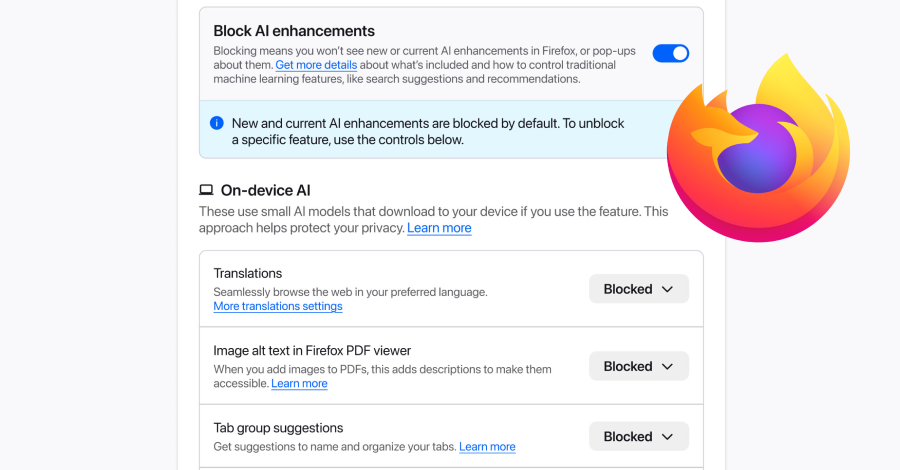

Mozilla has introduced a new centralized control within its Firefox desktop browser that allows users to disable all generative artificial intelligence features with a single setting. The announcement was made on Monday, providing a direct response to growing user concerns over privacy and data handling associated with integrated AI tools.
The new section, located within the browser’s settings, is designed to function as a universal off-switch for current and future Generative AI functionalities. According to Ajit Varma, Head of Firefox at Mozilla, the control provides a single place to block current and future generative AI features in Firefox. Users retain the option to review and manage individual AI features separately if they choose to utilize specific tools.
Addressing Privacy and User Choice
The move by Mozilla comes amid increasing scrutiny of how major browsers integrate and deploy AI capabilities, often by default. Generative AI features, which can include chatbots, content summarization, and writing assistants, frequently involve processing user data on external servers. This has raised significant questions about data privacy, consent, and user autonomy.
By implementing a master disable switch, Firefox is positioning itself as a browser that prioritizes explicit user consent. The feature ensures that no generative AI processing occurs without a user’s deliberate permission, addressing a core demand from privacy-focused segments of its user base.
Technical Implementation and Access
The control is currently available in the desktop version of Firefox. Users can find the new setting by navigating to the browser’s Settings or Preferences menu. The interface groups AI-related controls together, offering both the global toggle and individual switches for specific features that may be present, such as those from third-party providers.
This structure allows for granular control. A user comfortable with a local translation AI tool, for instance, could enable that while using the master switch to block all cloud-based generative AI functions that require sending data to external servers for processing.
Industry Context and Differentiation
Mozilla’s approach contrasts with strategies employed by other major browser developers. Competitors have increasingly embedded AI assistants and features directly into their products, sometimes making them difficult to fully deactivate or raising concerns about opt-out versus opt-in data policies.
Firefox’s development of a straightforward, user-accessible off-ramp for all AI functions is seen as a differentiating factor in the competitive browser market. It aligns with Mozilla’s longstanding principles of building an open internet and creating technology that puts people first.
Future Developments and Rollout
Mozilla has indicated that the new control section is intended to manage both existing and forthcoming AI integrations. As the company explores additional partnerships or develops its own AI features, the master switch will apply to those as well, ensuring continued user oversight.
The company is expected to monitor adoption and feedback on this feature closely. While initially launched for desktop, similar user control frameworks may be considered for mobile versions of Firefox in the future, depending on user demand and the expansion of AI capabilities on those platforms.
Source: GeekWire